Main Site Blog Help

Using Flashcards?

Hi ChinesePod, I watched the video on using flashcards. But it seems the new site doesnt have the features noted in the flashcard instruction video. Is there an easy way to make flashcards from ChinesePod lessons? Thank you very much. Sincerely, Russell Smith

13
created: R Jan '20 last reply: M Oct '21 56 replies 3.6k views 12 users 0 likes 0 links

Frequent Posters

18
11
6
5
5
3
2
2
2
2
1
1
There are 56 replies with an estimated read time of 1 minutes.

Hi Russel,

ChinesePod has a new Recap App with flashcards in it. Maybe you could give it a try. As for the new website, we’re now trying to build a page for you to download all kinds of customized flashcards. If nothing goes wrong with it, we might see it in the near future.

Betty

3

Hello,

do I get that right. In the new Dashboard the Flashcard function does not exist any more. So if I want do use this function (on the Laptop) i have to change to the old Dashboard every time?

Thanks for your reply
Patrick

3

Hi Patrick,

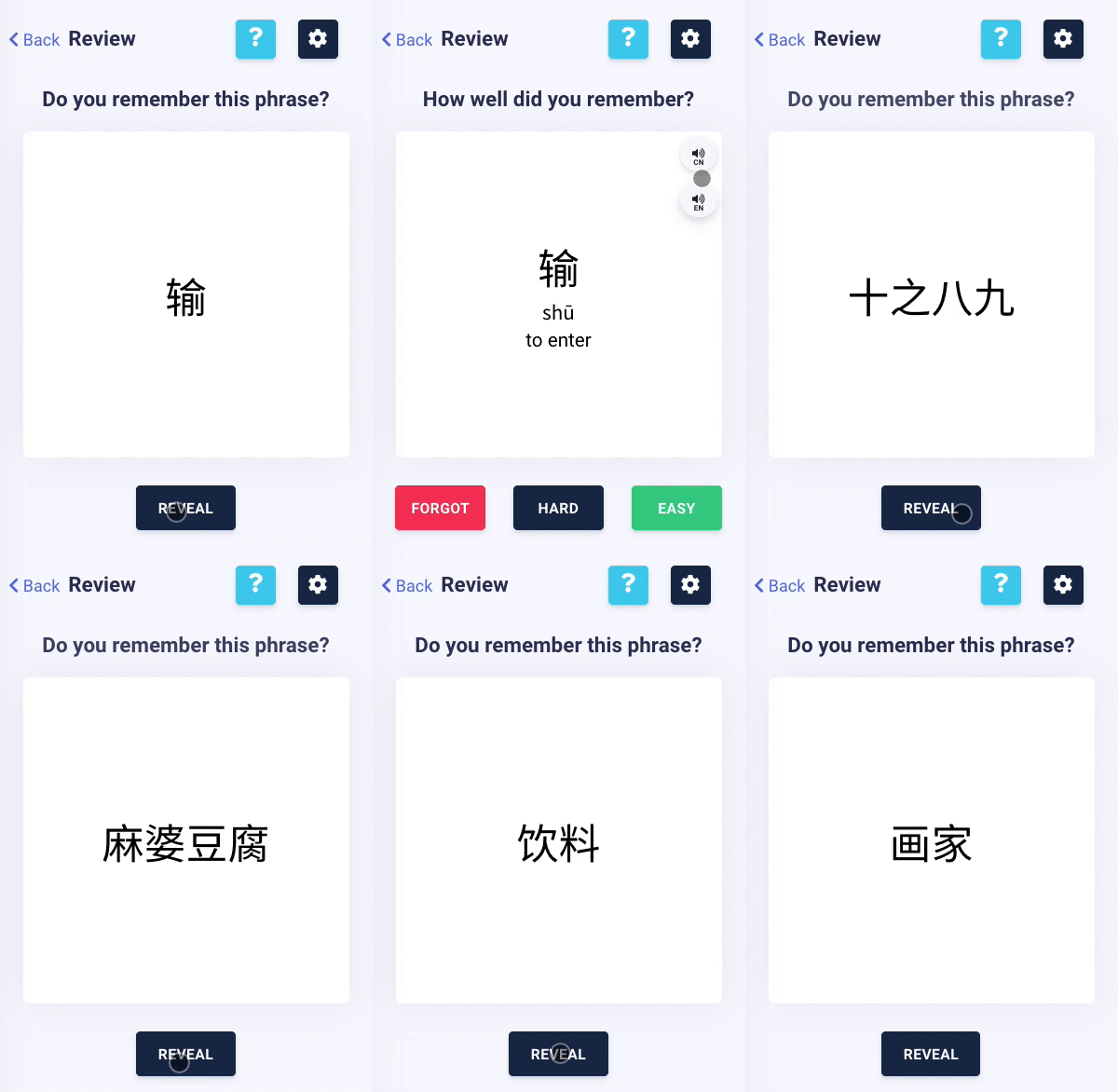
We have launched our new flashcard project recently! Just go to the sidebar on the new dashboard, simply click on “Review Vocabulary” and start enjoying our latest flashcard function!

You can go to this link for more information:
https://www.chinesepod.com/flashcard-project

You’re very welcome to join our beta test to share with us your suggestions and feedback. We would love to hear your thoughts!

Rebecca

3

Looks very promising. I am one of the ones that have asking for sentence flashcards and audio flashcards and so far it looks fairly user friendly. I just now spent a few minutes on it, so I cannot say anything about the SRS implementation yet. I have way too many saved items, so I would definitely only want to review selectively. I hope this will be an option.

3

Hi Podster,

Good to hear your feedback! Hope you’ll have time to join the beta test and let us know what you think in detail!

Rebecca

3

I have tried the “beta implementation” using the link you provided. A few questions:

  1. Betty mentioned a ChinesePod Recap App. Is this a mobile app? I couldn’t find it in the Apple app store. Maybe she was referring to this new desktop implementation?
  2. Ideally I would like to have a mobile app where I can get all the cues and answers in audio format. For example, hear my selected English sentences from the existing audio review, then have a pause in the audio longer than what is currently normal for the audio review in order to try to speak the Chinese translation aloud, and then hear the Chinese sentence that corresponds to that English prompt to know if I got it right or to teach me the correct answer. The way the flashcards are set up now in the beta is that you can hear the Chinese sentence as a prompt, but it looks like the English is not an option.

I provided this feedback via the link within the beta review page, but thought I should send it to you as well since you seem to be about the only person replying to anyone currently. Thanks for your attention.

3

Hi Podster!

  1. ChinesePod Recap is a mobile App and it’s available on Android. (We’re still working on the iOS version!)
    It provides audio recaps along with flashcards in different length (90 seconds, 3 minutes, and 6 minutes) as review segments of our lessons.
    You can find more information here:
    https://www.chinesepod.com/recap
    This is the link to Google Play store:
    https://play.google.com/store/apps/details?id=llc.chinesepod.recap

  2. I think that’s a good idea! If I understand correctly, what you’re proposing is kind of like an audio review with longer intervals with customized vocabulary? I would say this is quite different than the flashcard idea, but definitely doable. The recap app I mentioned above has a 90 second version for most lessons, and it includes an audio review of the most important phrases and vocabulary as well as visual aids (characters, pinyin, and English on the screen). It may be similar to what you’re proposing, but I imagine your idea would be something that you can listen to while on commute or exercising, without looking at your screen?

I appreciate that you also posted your feedback here! It’s always good to see everybody’s opinion and suggestions on the forum. It’s a nice way to spark conversations!

Rebecca

3

Yes, like an audio review, but with customized sentences, collected by the user from the existing audio review sentences from any number of different lessons. (Not just a review of vocabulary from a single lesson, but user-managed groups of sentences in the same way that users create flashcard “decks.” )

As to interval, I think maybe I was not clear. I am not referring to the duration of the entire review session. I just mean that in the existing audio review it often seems like I don’t have enough time to think of and utter the correct Chinese sentence for the spoken English prompt. I certainly don’t need 6 minutes to remember one sentence!

I would suggest you take a look at two existing products as a benchmark for prompting sentences: Pimsleur audio recordings (which is a kind of SRS, I suppose, but without the ability that a computer has to “grade” the user and adapt accordingly) and Learn In Your Car Foreign Language Series, which is similar but does not do as well as Pimsleur at reinforcing through repetition spread out over time.

I’m glad you think it is a good idea. Some users besides myself have been asking for something like this for a few years now. I am happy to see that CPOd is making some innovations on the review front and hope you can extend it.

3

Hi Podster,

Thank you for your further explanation, now the idea is really clear!
Just so you know, the 6 minute version of the Recap App is a condensed lesson that reviews the most important teaching points in the original one. Don’t worry, you won’t have to review only one sentence for 6 minutes! :slight_smile:

I am familiar with the Pimsleur method and have tried it myself when learning a different language. I like how you can just listen to the recording and repeating the phrases when doing other things but at the same time you’re getting the valuable language input consciously (sometimes even unconsciously). While it is very effective for beginners, it is too slow for more advanced students. So the idea of using the method on a customizable audio review is great!

Rebecca

3

Hello Rebecca

Please can you give us an update and an overview of what functionality is currently available, where?

The Flashcard Recap app sounds interesting. I have an Android phone (Huawei!). But when I use your link to Google Play, or just search for the ChinesePod Recap App, it does not appear (as of 9 Nov 2020…)

EDIT: I have just seen the thread in the forum under Apps.

How is it possible to take the Android app down for a complete month and still not have any schedule for when it is going to be reinstated?

I am trying to figure out what approach to take with flashcards and with lesson reviews. Do other users have any thoughts? The impression I am getting is that being tied to Chinesepod technology for this is an extremely bad idea.

Chris

3

Hi Chris,

I apologize for the late reply and I’m sorry to say that currently I have no updates about the Android ChinesePod App, Recap App, and their scheduled timelines. I can only say that the App is under review and unfortunately it will not be reinstated in a short time, at least not this year.

On the other hand, the flashcard feature is our latest added function on the website, and you can access it by going to the sidebar on the new dashboard, and click on “Review Vocabulary”.

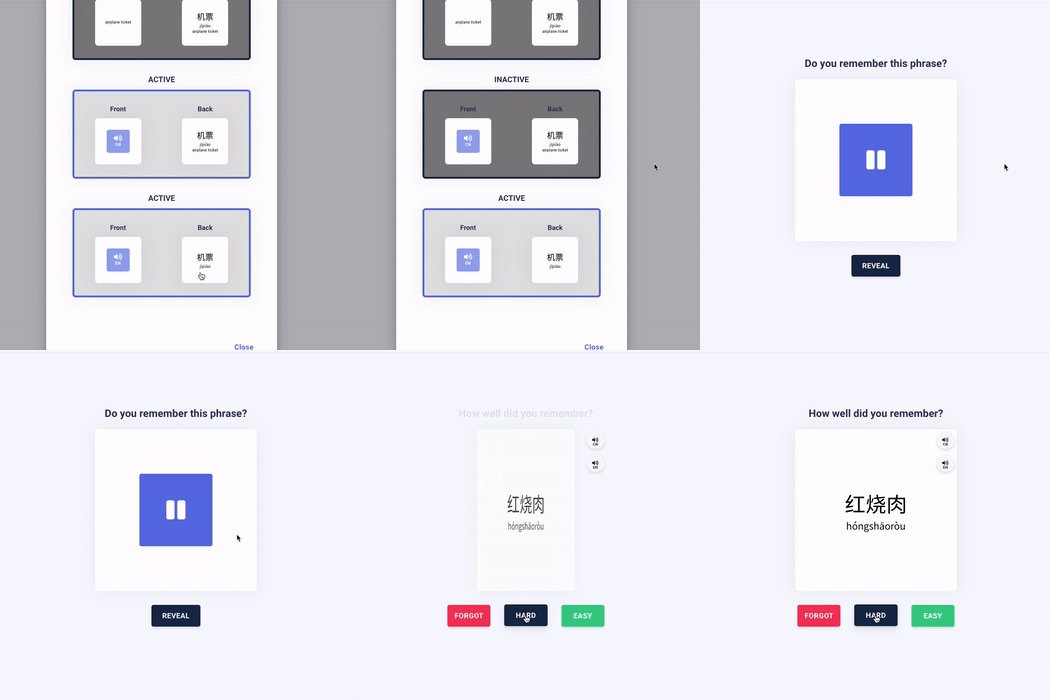
You can customize your settings by clicking the button on the right.

unnamed

You will see the following options for prompts. The first one shows only characters, the second one only has pinyin, the third one show English translation, and the fourth one plays the audio of the phrase. You can click on the options to activate/deactivate them. If you choose more than one prompts, then you will get all of them randomly. If you only want the audio prompts, then you can deactivate all the others, like the image below:

I believe this is a very good way to refresh your memory on the vocabulary or sentences of your choice and to give yourself a practice test on your weakest points ( listening, pinyin, or meaning association). Plus, you can also add sentences from the dialogues and the expansion tabs in your vocabulary list, allowing you to practice not only words and phrase like in an ordinary flashcard feature.

I will be sure to contact you when we have a more concrete timeline as to reinstating the Apps, and thank you for understanding. Don’t hesitate to contact me if you have other questions.

Sincerely,
Rebecca

3

Hi Rebecca

Thanks for the reply. Yes please, keep us informed.

Regarding the flashcard functionality, it looks promising. Having just tried it, I would have the following comments and requests, to make it more useful.

Having listened to an audio/video lesson, it is natural to want to add the vocab for that lesson. I have just tried that with the last lesson I studied (“Choosing a Room”) in order to test it.

The downloads have the pdf of the dialogue and the vocabulary. But many of the key words of the vocabulary listed in the dialogue and the pdf (dachuangfang etc - the whole point of the lesson!) are not listed under the Vocabulary tab from where you can add words to your vocab/flashcards. So a lot of value is lost.

The easiest way to use this for the user would be to have the Save All Vocabulary button provide the opportunity to create a new deck in your Vocab with the name of the lesson. It seems this does not happen.

Then having got all these words into your Vocab, there is no way to Shift-select them to block select all of them and move them to a new deck, given you have to do that manually.

A lot of it comes down to the care with which the vocab list gets prepared for the purposes of the flashcard study. I know we are all different in this regard, but I do find it bizarre that somebody chose to highlight “and”, “le” and “de” as vocab items in this lesson (which I then have to manually exclude) rather than the room types!

Perhaps for subscribers you could be given the option under Downloads to download a spreadsheet with the pdf vocabulary words in it (Hanzi, Pinyin, Translation). This would be awesome because it allows quick edits and to flexibly build our own vocab for the lessons. I would do it this way if it was available.

Thanks

Chris

3

Chris,
Can you just add it from the dialogue tab instead? Go to the dialogue tab and second line begins with the sentenced 大床房没有了。Point the cursor to the word 大床房 then click on it to see the word, the pinyin, and the English translation. You should also see a plus sign that you can click to add the term to your vocabulary collection.

3

Thanks Podster,
Wow I never knew you could do that! I don’t remember the + sign being there previously! Thanks that is a big help.

3

Hi Chris,

Thank you for the suggestions, and thank you @podster for your answer!

I agree with your idea about automatically creating a new deck for all the vocabulary in a lesson. It sounds like it could be very useful to a lot of users. Right now we can’t see which lesson the vocabulary is from in the deck, and I can imagine it can be inconvenient if you want to go to the lesson for review.

As for your suggestion on a spreadsheet with vocabulary words in it, although this is not available right now, we do have a function where you can copy the characters, pinyin, and English translation of the vocabulary (or sentence) of your choice. Simply click on the “copy” button, and you can paste the information in your own study materials.

For example, the output for the above vocabulary would be: 图书馆 - túshūguǎn - library. I know it’s not ideal and there’s probably lots of copy & paste you have to do, but I just wanted to let you know this is also a good way to make the spreadsheet in case you haven’t noticed!

Sincerely,
Rebecca

3

Hi Rebecca

No, I hadn’t noticed that either! Thanks!

This is so close to doing the job. I see it is available from your own Vocabulary. But it is only possible to copy and paste each word individually! If you could Select All, Shift Select etc all or a number of words in your list, and then once off copy them all to the clipboard, this would instantly get us 95% there.

Thanks

Chris
3

You are welcome, and no worries; indeed the plus sign is something new.

3

Hi Chris,

We also just added Import / Export options for Vocabulary and Deck Vocabulary

Screen Shot 2020-11-27 at 12.50.36 PM

These should let you import / export vocabulary to / from vocabulary decks directly.

Obviously, we’re still testing these out, so let us know if you run into any issues.

3

Thanks, that is great! This is really welcome.
Testing it out on my vocabulary list is has worked absolutely fine.
Nice step forward!

3

PS: There is also a plus sign for the entire sentence to the right of each sentence under the dialogue tab. You can now add sentences as well as individual words to your flash cards.

3

Hey podster!

Yeah, so currently there are a few things you can ‘collect’ for your vocab - some old, some new.

  • An entire sentence from the Dialogue, Expansion, or Grammar tab.
  • A phrase from a sentence from the Dialogue, Expansion, or Grammar tab.
  • A phrase from the Vocabulary section.
  • All phrases from the Vocabulary section at once.

We’re also currently working on ways to make our flashcards more useful - we’re rolling out support for English recordings today.

And we’re looking at the different combination options we want to add to the current Settings - including an initial audio prompt in English (similar to what currently is done in Chinese).

Also - we’re super open to any comments and suggestions to expand these features even further. :grin:

3

Hi all,

Just wanted to add to this with our latest release - options to get an alternative English audio cue.

Kapture 2020-12-03 at 15.46.42

If you enable the option to read the Chinese audio cue on revealing the definition - you can use our flashcards as a full audio experience - front and back.

3

Hi there, I tried importing csv files with unicode encoding but the csv does not hold the format of the characters. Also if you can provide more information…it would be most helpful.

3

Hi! Yeah, I saw a few cases when saving vocabulary to CSV on a Windows machine. Can you paste an example of what it looks like if you open the CSV file in a text editor?

3

FYI if anyone is struggling with opening the sample CSV we posted with the Chinese characters intact, make sure you’re importing the file with UTF-8 encoding - the default Excel settings (double click on the file, for example) are not meant for non-English text.

Older article about it:

3

No, rozkalns…you misunderstood me.

I am referring to preparing a file in csv for importing into ChinesePod.!! I have a file in EXCEL (see image )
HSK in Excel|416x107
When I save it as csv in Unicode UTF-8, it turns out like this ( see image )
HSK in csv|367x287

3

Is there a way, I could print those flashcards? What program should I use?

3

Hi Lola,

You can export your vocabulary decks by clicking on “export” on the vocabulary page. An excel sheet with Chinese characters, translation, and pinyin will be downloaded.

If you would like to print them in the form of flashcards, you can organize your vocabulary list in other flashcard websites such as Anki (https://apps.ankiweb.net/) or Quizlet (https://quizlet.com/).

Hope this helps!

Rebecca

3

Great! Thank you :blush:

3

Hello does this vocabulary trainer also show me the vocabs I knew later on again? Or does it show them only once and never again?

3

Hello Markus,

Yes the system would still show the vocabulary again even if you consider it as “easy”!

Let me know if you have anymore questions!

3

i mean you can know a word once or several times even but maybe forgot it after 3 weeks. So there is a real thought out system behind to show me the cards always after a longer time to really bring them into the long term memory right? I am asking cause I am using Pleco that has that but it would be good if I can switch completely to Chinese Pod for learning the vocabs.

3

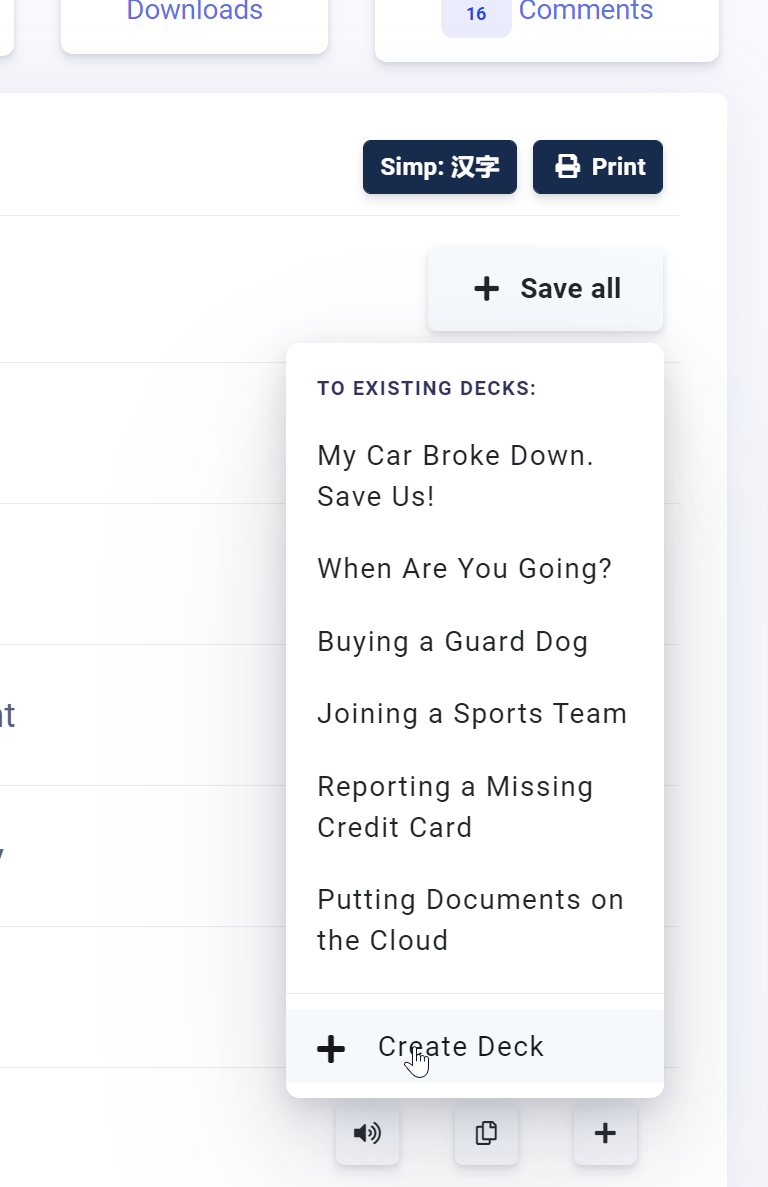
i can imagine that once i added a lot of vocabulary with a deck for each lesson this dropdown would be not good because the button is at the end:

i think it should rather be at the top

3

Hi Markus,

Thank you for your explanation. I believe you can review the selected deck of vocabulary repeatedly with no limitation but the system doesn’t particularly select words that you studied a long time ago. In other words, each word in your vocabulary deck gets an equal chance of appearing in the flashcards. I hope this is clear. Thank you for your feedback on the button in the dropdown menu. We’ll see what we can do!

If you have any academic questions, you can reach me directly at rebecca@chinesepod.com!

Rebecca

3

so you mean the system doenst consider that i set “easy” many times for the words I learned and shows me them anyway like all other words?

3

Let me confirm this and get back to you!

Rebecca

3

It should do that ofc and be a flashcard trainer that makes sense. All people want that the most rather than new lessons. Ask the people if you dont believe me. They all want to use this so they do not have to export, then import at Pleco and do this all the time. We all want a one stop shop at Chinese Pod and if that vocabulary trainer has no flashcard system we do not have a one stop shop yet

3

I also think that it should be more clear what implications each button (Forgot, Hard, Easy) has for the further course of my review sessions. Thank you.

3

Hello Markus and Halifax,

I have contacted the designer of our flashcard feature, and now I have a better understanding of it. Please disregard the information I provided earlier and I’m sorry about the confusion.

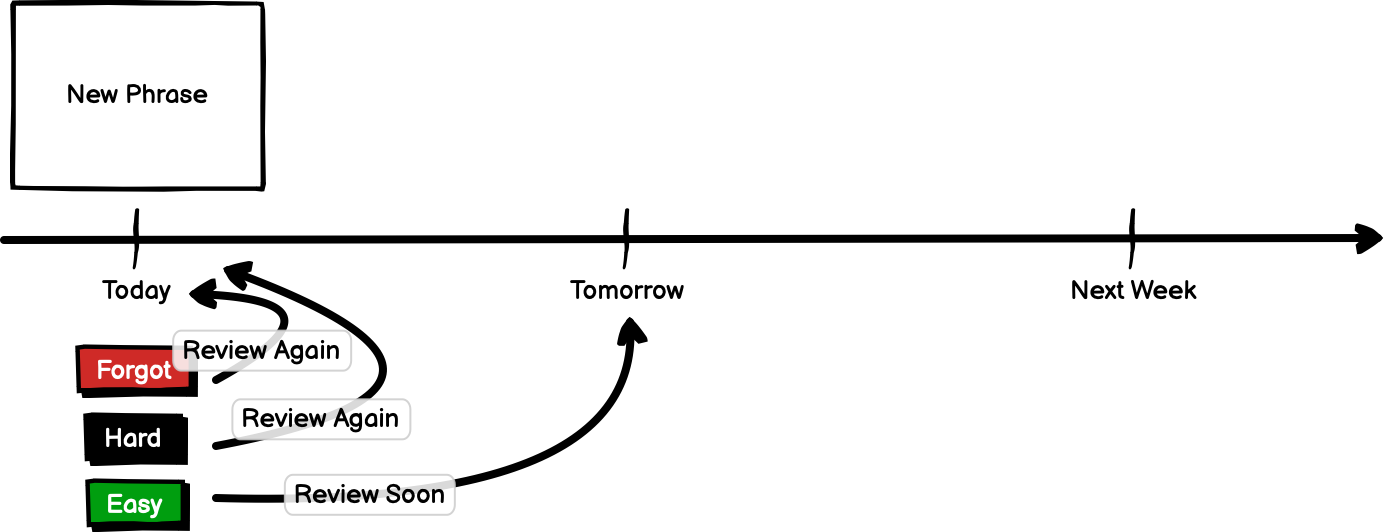
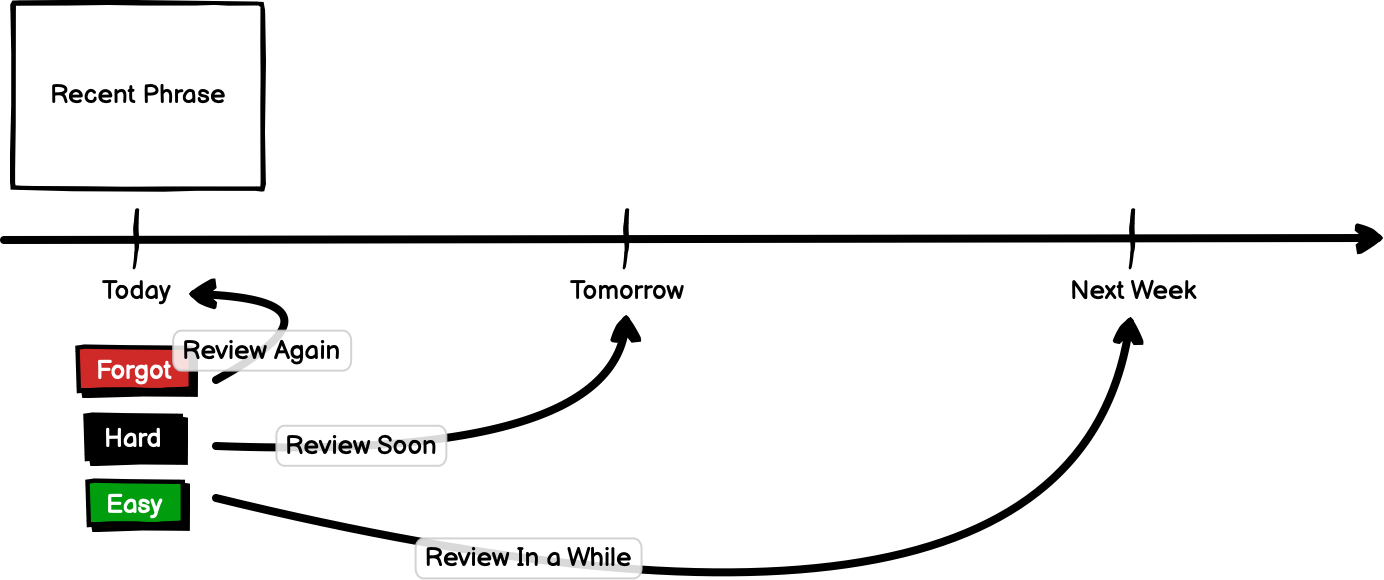
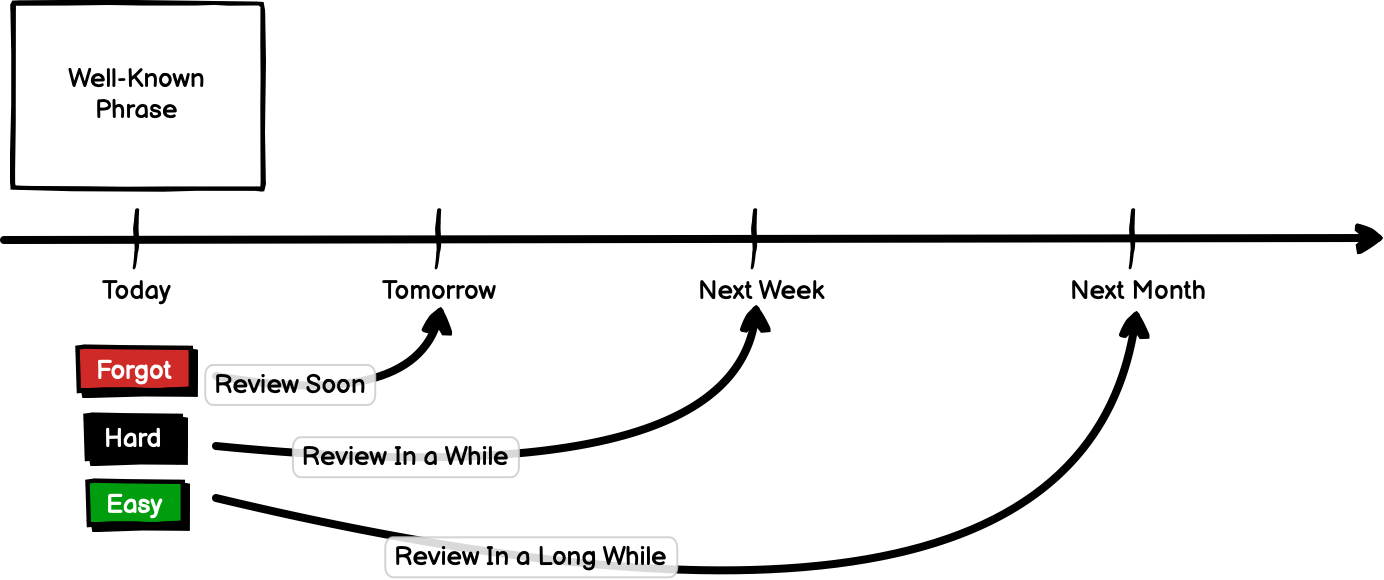
The basic logic is if you click “hard” on a card, the system will not store it as “remembered”, and it will force the users to review it by showing the card frequently. In contrary, if you press “easy”, the card will show up less frequently but it never disappears.

I’ll add more information about the flashcard system here!

Rebecca

3

Hey!
That’s great, thanks for the info!
Is there a major difference between the ‘forgot’ and the ‘hard’ button?

I am also really advocating for a ‘delete’ button. Cause after a while, having lots of cards added already, one may want to delete certain cards. And going back to the vocab list all the time, specifically looking for a flashcard to delete it is quite time consuming.

3

Hi Halifax,

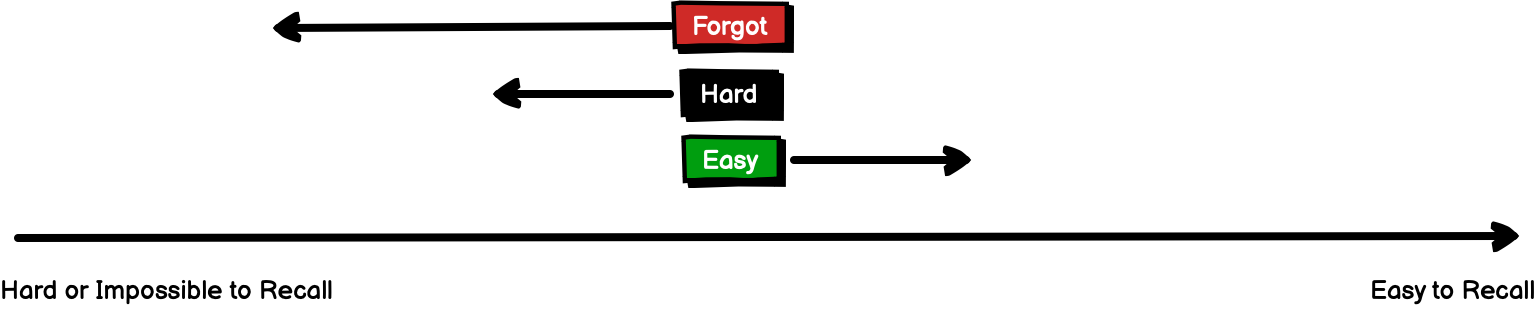
I hope the following illustrations would shed some light on your question. First one shows how “forgot”, “hard”, and “easy” correspond to the difficulty level to recall the phrase.

Depending on where the phrase stands in your reviewing cycle (new phrase, recent phrase, well-known phrase), the behavior of the system changes in terms of the frequency and schedule of the cards, as seen in the following illustrations. Please note that the times are only for your reference and they are not exact.

Thank you for the suggestion on the delete button! It seems that continually pressing easy on the cards that you would like to delete might be a temporary solution to your problem. There is also a chance that one might forget the easy phrases after a couple of months, in that case reviewing them after a long time could be very helpful. Please do let us know if you still find the “easy” cards coming back repeatedly to the degree that you want to delete them altogether.

Rebecca

3

wow! that is great! why didn’t you put it in the information page of the flashcard feature?

How do the different card combinations relate to this? Lets say, regarding one single flashcard, I find the ‘audio to Chinese character combination’ easier than the ‘Chinese character to English translation combination’. And I click easy on the first and hard later on the other. Will both count as either hard or easy then? Because I have never seen that combinations of the same flashcards are split up between two different review sessions.
(hope you understand what I am saying, its not easy to express this :smiley:)

The delete button definitely would for sure not be used as often as the other three. You are completely right, most of the flashcards I would want to come back in a future session eventually, even if it is weeks from now. And I think the way it works right now is already pretty good. However, if there actually is a situation in which I really would like to delete a card because I grew tired of it, then its just a bit of stretch to go through my entire list, just to find it and delete it. Especially if I already have quite a few cards saved up. In this case it would be easier to delete the card on the spot when I encounter it in a review session.

Anyways, thanks a lot for your efforts!!

3

Hello Halifax,

That’s a good question! To put it simply, if you click on different difficulty levels for the same vocabulary, the system takes the lowest level (from low to high: forgot-hard-easy). So if you click on “hard” and “forgot” based on different prompts on the same card, the system is going to assume that you forgot its meaning.

Thank you for so many good questions, I’m sure our discussion of the flashcard feature is very helpful for other learners! If you have more suggestions, keep them coming!

Rebecca

3

if you press 10 times “easy” and it takes 6 months till it comes back thats also OK and better than delete I think because after 6 months you might have forgotten it and if not then you click yes and it maybe takes 1 year till it comes again.

3

this is exactly what was needed. its good that this system is behind it because it means that this vocabulary learning system can be used now. in the past it was not useable as it always just showed you the same cards with no system behind.

3

would be good if i can see the word somewhere that are the hardest to learn for me

3

That’s a good suggestion! Do you mean having an overview of which words are hard? Perhaps a “save for later review” star-shaped button on each card can also be implemented so that after the review of the deck you still remember which words you have trouble with.

3

does someone have a good explanation for what to do with the csv file so i can import it in pleco?

3

Hello Markus,

I think pleco only takes XML file format but I could be wrong.
On the old dashboard, we have the option to export XML format so maybe you could try it!
https://chinesepod.com/tools/export/
I hope this page is helpful for you:
https://iphone.pleco.com/manual/30200/flash.html#import

Rebecca

3

With a BASIC-level subscription, can you export vocabulary lists to other flashcard programs (Anki, Pleco, Skritter), or does this require PREMIUM? (I’m a bit confused as to whether Premium is needed to use the CP flashcard app/function specifically, or whether it is needed to be able to use ANY kind of vocab flashcards in conjucnction with CP. I gather that even Basic-level users can just print out their vocabulary and review it on paper though.)

3

Hello Kristjan,

I believe even under the basic subscription you can still export the vocabulary. Under “Vocabulary” tab on the left side of the website, you can export all the vocabs to a csv file which you can open with excel. I believe to import the vocab list into Anki and Pleco you need other types of files, such as XML, but unfortunately, we don’t have that option right now.
Another less convenient way to organize your vocabs is to go tot he vocabulary tab within the lessons and there you have the option to copy and paste the Chinese characters, pinyin, and English translation.

Rebecca

3

Thanks for the helpful reply! I also noticed that sets of lesson vocab tend to just already exist in Skritter and will come up when you look for them there–though maybe not for every lesson.

3

Oh that’s great! But I think you can only find vocabs in older lessons in Skritter though, but I might be wrong.

3

Hello, could you integrate a pleco button in the vocabulary app like that was there before in the old app?

3

Good suggestion, thank you!

3

Because I want to learn definitions with the Chinese Pod app but the characters inside Pleco. But I want to add always one by one specific words that I just mastered with Chinese Pod to Pleco and therefore it would be super good if there is a button in the Chinese Pod app. It is possible because the earlier complete app had such a button.

3

Log in to reply to this topic.