Main Site Blog Help

Updates to ChinesePod website (April 2017)

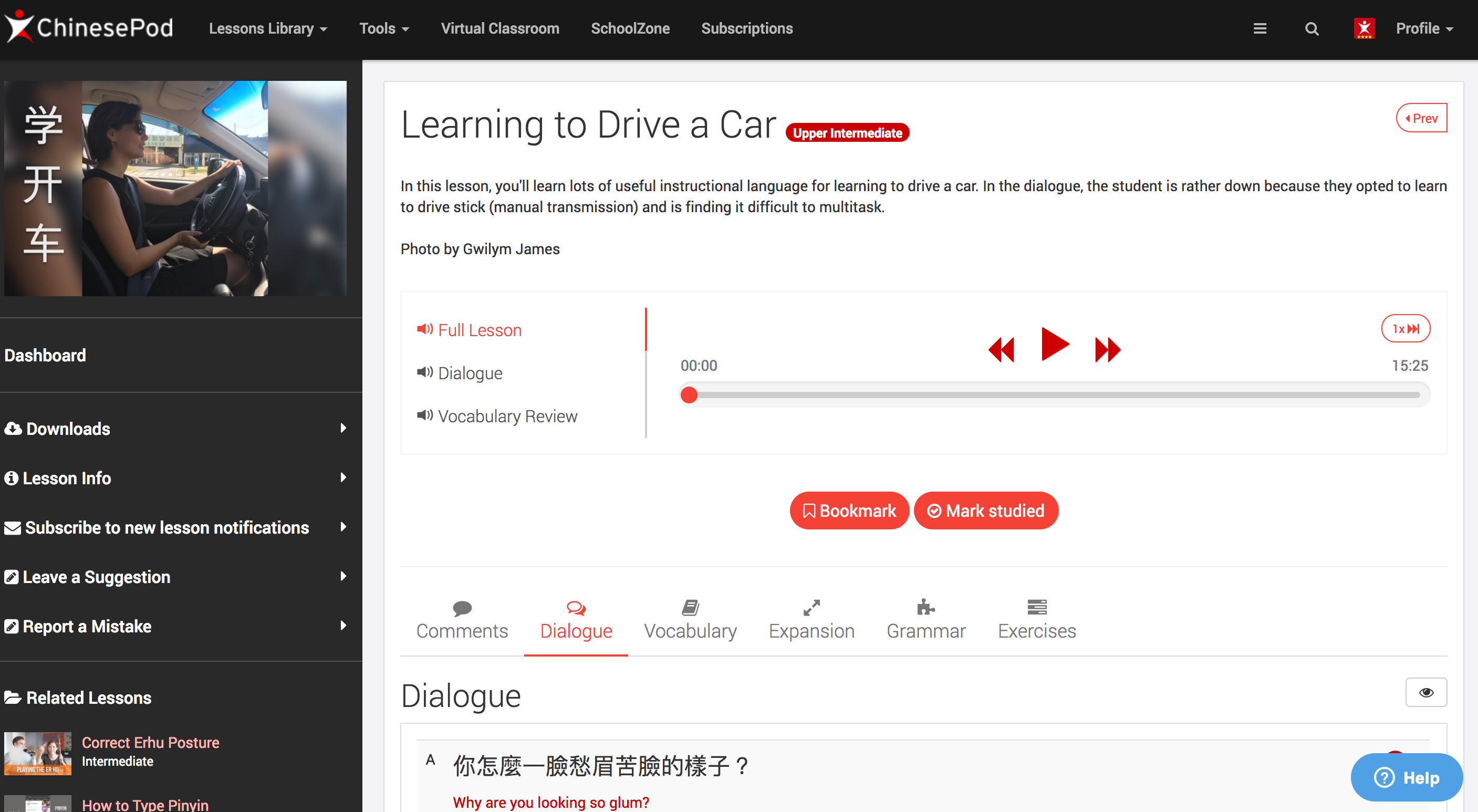
In the coming days, we will be updating the look and feel of the current ChinesePod website to match the look of our other products and apps.

The first update will be an aesthetic one, with improved colors and layout, to better display our lesson content.

Once this is done, we will begin implementing new features and improving how lessons are organized/discovered.

Feel free to leave your comments below on what you would like to see added in terms of features for the coming updates.

Which ideas are closest to your heart? Let us know in the comments.

Some ideas:

  • Pre-intermediate level to help jump the gap to intermediate
  • Floating audio/video player that scrolls down page
  • custom users playlists
  • custom user tags (to build lists of lessons)
  • Dashboard with most recent, studied lessons
  • Ability to mark vocabulary as “known” or “unknown” and give “% known” for each lesson
  • Upon hitting a lesson as ‘studied’ create a countdown timer for when it is due to be studied next.
  • custom fonts

Which of these sounds good. Any more ideas? Leave a comment.
13
created: C Apr '17 last reply: 8 Jun '17 30 replies 4.7k views 18 users 0 likes 0 links

Frequent Posters

6
4
2
2
2
2
2
2
1
1
1
1
1
1
1
There are 30 replies with an estimated read time of 1 minutes.

Awesome! I like Pre-intermediate level to help jump the gap to intermediate &
Floating audio/video player that scrolls down page the most.

All of my learning is on my phone and in the car using the mobile site. Please keep the mobile site as it’s much harder to sort lessons chronologically and also by level using the app. Please keep the ability to list the lessons chronologically. I like to study each one in order without wondering if I missed one.

I’ve always wanted the option to play the translation portion of the lesson similar to the current ability to play the dialogue separately. At my stage of learning, it’s more helpful to listen to the slow dialogue with plenty of pauses and repeat the sentences to myself. The regular dialogue still is too fast for me and there’s no time after each sentence to repeat it and internalize it. I could review past lessons more easily if I could play only the translation portion. With the half-sped playback button, of course ;).

3

“Ability to mark vocabulary as “known” or “unknown” and give “% known” for each lesson”:
I think that would be very helpful. I find some intermediate lessons to be harder than some upper-intermediate lessons for me because I know more vocabulary in certain subjects. If I knew before hand, I’d know if I should read through the vocabulary list first or not. But if you do this, it would be helpful to have an “import” function to give the site a list of words I already know

“Upon hitting a lesson as ‘studied’ create a countdown timer for when it is due to be studied next”:
This could be good. Personally, I just put together 20 minute long dialogue play lists in iTunes, then put reminder cards to listen to each in my Anki, so I probably wouldn’t end up using it myself

3

I would find “Floating audio/video player that scrolls down page” most useful :slight_smile:

3

The new outlook is awesome & classy. I find some ideas for your consideration with regards to further future improvement/enhancement:

  1. Is it ok to integrate Traditional Characters in one transcript ? I think it will save some time during downloading.
  2. Is there any way to save some words that we have studied? maybe like Word Bank or something.
  3. Is the video downloadable? Hmm it would be nice if we can save it for review or incase we want to study offline.
    Thanks.
3

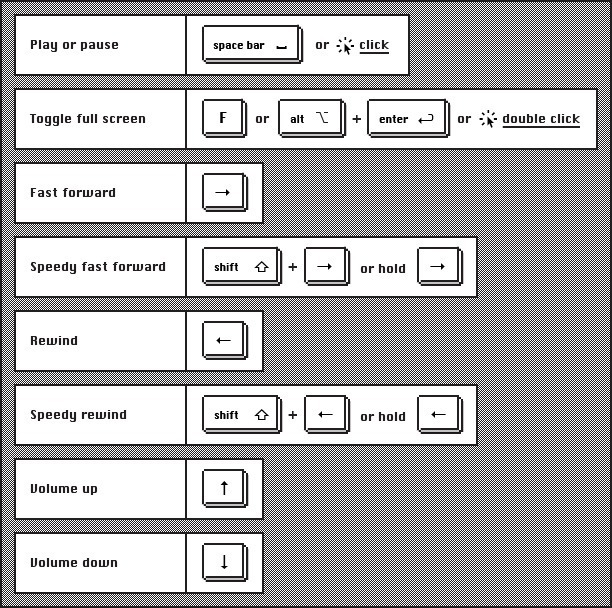
Please oh please have the video player either a) floating on the page or b) provide a hotkey to pause/play audio!

This will allow me to scroll down the page to read the dialog and adjust my listening as needed.

The new look site is awesome btw, along with most everything you guys do. 加油!

3

These would be immensely helpful:

-Floating audio/video player that scrolls down page
-Ability to mark vocabulary as “known” or “unknown” and give “% known” for each lesson

If you do implement the second one, it would be nice to create some means for more advanced students to “catch up” in logging their known vocabulary (which is one issue I have with Lingq). Perhaps a page that lists vocab by HSK, where we could rapidly go through the list and mark known words (or even mark whole HSK levels as “known”).

Also, offer “% known” not only as information but also as search criteria.

3

Yes, hotkeys would be nice. This is one thing I love about Youtube’s player. Left arrow brings you a few seconds back, right arrow brings you a few seconds forward.

3

The site is getting better and better with every update! The colour change of the left-hand sidebar makes the dashboard much clearer.

I’d like to see:

  • Floating audio/video player that scrolls down page

  • Custom user playlists

I would also like to suggest a couple of design-based things about the site:

  • Would it be possible to make the ‘bookmark’ and ‘studied lesson’ icons a little clearer? At the moment they can get lost in the pictures they are on top of which sometimes makes it difficult to see which lessons you’re working on. Possibly have them separate from the pictures?

  • Currently the lesson library is displayed using large images/video stills and has an option to sort lessons by date, which is great. It would also be really good if it was possible to display the lessons in a list with a smaller image at the side and a brief description of the lesson content. Having this for the Android app would also be a big improvement.

  • Is there any way for the site to have less menus? There seems to be quite a lot and I often find myself clicking through them to find what I’m looking for. For example, although I understand you are trying to promote SchoolZone as a new feature, I feel it is not something that is relevant to the vast majority of users. One more example would be the placement of the ‘Subscriptions’ menu in the centre of the top bar - this probably isn’t going to be used very often and would make more sense to be under ‘Settings’ or ‘Profile’. Also, there appear to be some menu options that repeat the functionality of others, eg the Lessons Library has the same function as the left sidebar on the Dashboard.

Thanks!

3

The video player should respond to these commands

.

3

“Upon hitting a lesson as ‘studied’ create a countdown timer for when it is due to be studied next.”

This is what I’m really after for ChinesePod - some built ability to revise on a schedule and organise your studied lessons, which also flows into your other suggestion “custom user tags (to build lists of lessons)”

Both of these would be fantastic. Actually just about everything on the list would be great! thanks

3

Actually, to follow on from my comment, I like using the “expansion” and “grammar” sections of each lesson to improve my listening. At the moment you can hide the pinyin and translation by default, but another option to hide the chinese text would also be great, so I can’t ‘cheat’ by glancing at the text before the audio is played and thus ruin my chance of successfully listening to the audio and figuring out what is being said. Thanks

3

I second that “hide text” option idea. I use those sections in the same way, and often accidently see parts of the sentence

3

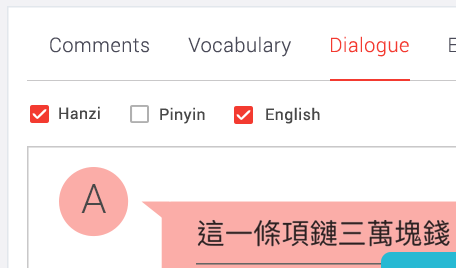
Thanks. We have added this suggestion to the development board. Something like this?

3

I just want to say, I came to ChinesePod.com a couple of days ago to find the new design. So far, I am loving it! It finally feels like a modern website instead of something left over from the last decade. The site not only loads much faster, but filtering lessons by level actually works! Thanks for the great job, it has renewed my commitment to improve my Chinese! :smiley:

3

Hi Gwilym, yep something like that where you can untick all (hanzi, pinyin and english) and just get a play button to hear the audio would be great. Ta!

3

Thanks for the compliments. At the moment it is mainly just a visual upgrade, but we’re hoping to roll out some under the hood improvements as well as added functionality soon. Also, keep an eye on the new apps which are also under active development.

3

The following would be very much appreciated!

  • Floating audio/video player that scrolls down page

  • Custom user playlists

Thanks for all your hard work on the website. I recommend Chinese Pod to anyone who will listen (and some who won’t).

3

Agree. Today found the new red background with white characters while mousing around! It makes it a lot easier to check meanings. xie xie ni.

3

Floating audio/video player that scrolls down page would be very useful

3

Sorry, I posted this in it’s own thread, but it has a home here. Can someone delete the thread for me?

ChinesePod currently uses a coarse tiering system for difficulty levels. I see logic in how it works, but it is not always easy to know the actual difficulty relative to my learning path. As an example, I may know many words in an intermediate lesson, but not very many in an easy lesson. In that situation, the intermediate lesson may actually be easier for me. Also, because an individuals learned vocabulary can vary a lot, a specific lessons relative difficulty can vary tremendously between different individuals.

A solution could be to just track all the vocabulary from studied lessons and then add a “relative difficulty” tailored to each user which ranks a lesson’s difficulty based on, for example, a ratio of new and learned words. It’d be super informative to know that a lesson has x% new content and/or y number of new words based on a users “studied” vocabulary (i.e., the collective vocabulary from all lessons marked as studied.). It’s not a perfect solution, but I think it would help guide a learners progression immensely.

A difference between the proposed change and the one I’m suggesting is that a user can mark vocabulary for a whole lesson as tracked by marking the lesson as “studied.”

This would simultaneously solve another issue I have with ChinesePod, which is the lack of guided progression. Studying N number of lessons before moving on, again, is too generalized. Depending on content overlap, the amount actually learned can vary a lot based on which courses a person selects for their N lessons.

3

A feature I would really like to see, but I guess it is hard, would be an option to see characters with tone marks printed above them–but not pinyin spelling. A few places on-line offer this and many people on-line say they want it. I want to read characters with no pinyin, but I have a poor ear and memory for tones.

Another thing is, I would rather you not add a Pre-intermediate level to help jump the gap to intermediate. I do not feel strongly about it, because of course anyone can listen to whatever level they want. If you do add one, and I prefer to skip it jump straight to Intermediate then I can just do that. But my reason is that I am now working in Elementary but I learn each lesson very quickly. I usually listen to the lesson once and read the supplementary material and often get in the 90 percents on the exercises my first try and I am done. I do not need to really “study” them,

I have sampled some Intermediate. They are way harder–and I think that is good. I have to listen to the lesson several times, and come back to the supplementary material several times, and so far i have not dared work the exercises on an Intermediate lesson. I look forward to shifting into that more serious true “study” mode as I advance. I plan to finish 80 Elementaries (as you advise). But then I want to take on the Intermediates as they are. Learning has to be hard sometimes to work.

3

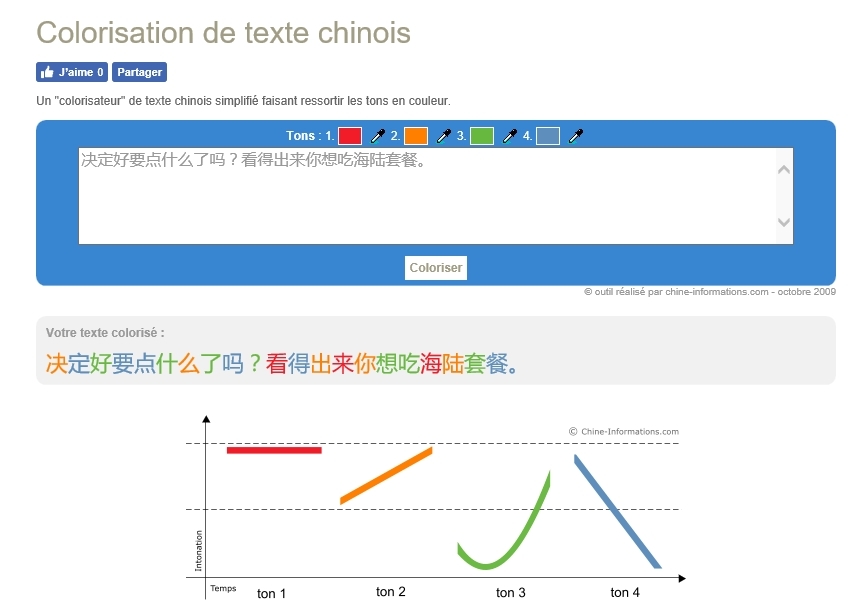
To have the tones without pinyin you can use online tools which presents the characters with different colors according to the tones.
Here is one.

https://chine.in/mandarin/outils/colorisateur/

The interface is in french but it is quite simple :slight_smile:

You just paste the chinese text and press the button “coloriser”

Hope that helps!

3

Ah! I had not realized this advantage of colorization! Very nice . It lets you indicate tones without altering the layout of the characters. Until now I thought “tone colors” were just something some people liked better than numbers or diacritics.

And I see you can cut and paste the results into MSWord with the color preserved, so you can make a reasonable colorized version of each dialogue transcript.

However, it is pretty inaccurate. That page got less than half right in the sentence 宝宝,穿上外套,我们出去玩啦。 Well, that can be a new kind of exercise for me, when I want to edit a colorized transcript of a dialogue. Or maybe there is a more accurate version somewhere. I will look.

But the more I look into it, the more I think if I am gong to have to edit it myself anyway, I could just as well do it in LaTeX with pinyin diacritics instead of colors.

3

Great website update CPOD! I’m stoked to see the follow through on your vision for the site. Nicely done!

Thought I was dreaming when I found the floating video player and language selection buttons today. Now when I sit down to study it is much easier to follow dialogues, check vocabulary, etc. Your improvements are obviously made with learners in mind and you take community inputs seriously.

Xie xie ni! :panda_face:

3

This has now been added. See:

3

This is now implemented. We hope it helps.

3

This has been added :slight_smile:

3

This is amazing. Exactly what I was after. Now if only the player that plays the short audio files (dialogue, grammar, expansion etc) would wait until the whole file is loaded before trying to play it. Hint hint :smiley:

3

This is a great addition!

3

Hi gwilym,
I use the dialogue single sentence replay a lot, and I prefer the web view to the app, because the web has no delay on second play of the sentence, but the app does have a large second time delay because it downloads again. I also like the exercises there which the app does not have.

Unfortunately the means that new floating video covers the top left of screen and makes it it almost unusable on a phone screen, and just annoying on tablet.

Suggestion is either to provide a pinning button on video frame near the full screen option, so you can pin it to original stop, or else to only float when the user has started to play it. A hide button might also work.

Next suggestion would be to disable video float while playing any of the audio, as I find it covers the audio controls, especially on small phones.

The video is probanly not relevant while doing expansion tests, vocab, grammar, or extensions tabs so therefore I think it should be hidden completely when on those tabs, though there would be no reason to stop playing if that was what the user was doing. Ie. Suggesting that you do not float on to other tabs.

But still I think float is really good when you are playing the video. Great work.

3

Log in to reply to this topic.