Main Site Blog Help

New Android App (V1) LIVE on Google Play

##We have released an updated version of our Android app and it’s now live on the Google Play Store.

We’d love to hear your feedback on the new app.

We are already busy improving this new version, so expect some big improvements in the coming months.

https://play.google.com/store/apps/details?id=com.chinesepod.app&hl=en

13
created: G Oct '15 last reply: G Jan '16 36 replies 7.6k views 12 users 0 likes 0 links

Frequent Posters

10
8
4
3
3
2
2
2
1
1
1
1
There are 36 replies with an estimated read time of 1 minutes.

@Matt_T Thank you very much for your rating and feedback on Google Play for our new Android app :wink:

3

@Armel @GwilymJames My pleasure, thanks for including me in the testing process. It was fun to get to try out and help improve the app early, even if there were some bugs.

3

The sound files download quickly. Actually, I am not sure that they do download because, if I click the ‘downloaded only’ button, I get the ‘Lesson data is not available.’ message for every category, even though I have listened to many of the lessons on my Samsung phone previously.
The black-on-red text has disappeared.
Font size can be increased. The problem here is that if the size of the characters is increased, the size of the pinyin and translation is unnecessarily large.
The translation can be seen for the whole dialogue or all the expansion sentences at the same time.
Negative points:
The word-by-word breakdown of sentences doesn’t seem to be available.
All the sound files for a lesson cannot be downloaded at once.
Questions: Can the app be used if I am out of range of my internet connection?
Is the ability to record my speaking and to get an accuracy rating going to return?
Are the flashcards of my saved vocabulary available?
Is this app meant to replace the old one, or is it a faster one to use when I have internet access?

3

The audio files stream which means they play a lot quicker. If you want to download the audio file onto your device, you need to touch the 3 dot menu and click download. That way you can listen on airport mode.

I’m not sure I understand.

We will try and improve this so that only the Chinese gets larger (or the english gets capped at say size 20.

We’re looking to add this in a later version.

Just click the 3 dot menu and click download to save audio to your device. The text should cache but the vocab/sentence audio files don’t download (currently).

This function was not very highly used, and added unnecessary complication. We might work on finding a new partner to bring something like this in future versions.

You can study the flashcards on our separate Decks app on Google Play

Yes, this app is still only on version 0.5 (compared to the old app (v3.93) but we’re hoping that in the next few versions it will vastly supersede the old app. That being said, you will still be able to download the app directly from us if you really prefer the older one.

Thanks for your feedback @dorothycowling

3

When it will be available for iOS??? :blush:

3

@GwilymJames said the app has already been submitted to the app store and it pending the approval process. Usually that takes at least two weeks so hopefully it will be available in the next week or two would be my guess.

3

I couldn’t log in. The first time I thought it was just bad timing, but it’s been a while now and I still get the same message. When I try to connect it shows: “can not connect to server! please try again.”

Should I use a different user/password?

3

@danielpioner I received this message a couple times and found that I had to exit and complete close the app from the multi-tasking and then re-open the app normally before I was able to get it to connect. I’m not sure if you already tried this but it’s what worked for me.

3

Thanks Gwilym for your reply. I am glad to hear that the sentence breakdown will re-appear and that we will be able to get the characters to appear larger without enlarging the latin script.

I did find the three dots and worked out how to download. Thanks.

The black-on-red text was used for one of the speakers in the old app. It’s hard to read so I am glad it has gone.

It looks as though this app will be overall far superior to the old one!

How do I add more cards to the decks app?

3

we’re having a few issues with our server these past two days (on website and app) so it’s possible that you tried to access the app when our server was down. We’re hard at work trying to find the problem, but have a go logging in again and it should work.

3

Thank you for your answer and sorry, I didn’t see that it was already submit ^^

Really impatient to see this update! I’m waiting it since few month :smiley:

3

Yeah that red and black text was a bad choice, although we’re still working on a better way to show the dialogue because the all white page is not as easy to read.

At the moment, until we have a better integration of saving words to decks, the only way to add new items is via the web, (or on the old app).

3

Still waiting on Apple i’m afraid. They’re very picky :smile:

3

It worked. 谢谢! Really cool app.

Just two questions:
a) is it possible to stream the video lessons (like Qing Wen videos)? It shows only the audio lesson as an option;
b) Additionally, should I choose to download a lesson what am I downloading exactly?.

Tks again!

3

I really like the “eye” button that let’s you quickly toggle between Chinese only and Chinese + Pinyin + Translation. However, in the next version, it needs to stay locked somewhere to the UI. Currently if you scroll the dialogue, the eye button scrolls off the screen and the user loses this functionality.

I think someone mentions it above, but I’d also like to see individual characters/words defined in some manner when needed by either tapping on the word or a full sentence breakdown as was done in the old app.

All in all, though, huge improvement over where they left the old app. Read your bio’s. Great to see so many with a UX focus on your team! It shows in what you are doing. Keep it up.

3

In Google Play under the ChinesePod logo it says “Designed for phones” . . . does that mean another version for tablets is forthcoming?

3

Does it say that on the phone app store? I can’t see it on the website.

The app works on Android tablets, but we will be working on optimizing it for bigger screens in the coming months to make the most out of the larger screen size. I think it could be used in some cool ways.

3

I went to Google Play from my Android tablet and found the new CPod app. The description specifically says “Designed for phones.” I have not tried it out yet. How’s the documentation?

3

Fantastic app! This version looks far better than the old one.

Two things - right now you can only show/hide all translations, instead of being able to tap a single sentence in the dialogue or the expansion. I hope that feature comes back, especially since as mentioned above, the eye tends to scroll off the screen, making it inconvenient to get a quick look at Pinyin/English for a specific sentence.

The other thing - will you guys be keeping the blocks of lessons i.e. Daiily Life 1-4? I don’t see those in the new app. I am very happy that everything is much easier to see separated by level, though. Good work!

3

@Armel @GwilymJames This is a feature that I would love for the mobile app. I can go to the website and download the video but having a direct link for the download within the app would save time and be much appreciated.

3

We are looking to add this in the next versions. In the meantime, if you click the 3 dot menu and open the lesson description, we have included a direct link to the video. It’s not ideal but saves time going on to the website.

3

I am quite disappointed in this. The app looks great, but I didn’t get to try it since it doesn’t allow access for Basic subscriptions. I have been a Chinese Pod subscriber for years, off and on, and as far as I know this is the first time that the app restricted access to Premium subscribers – I’m still quite surprised that just listening to the podcasts is now considered a Premium feature! For now the old app is still letting me listen to audio, but it stopped letting me see dialog transcripts. So this means I would need to move up to Premium just to get back to the same level of access I had before…which I guess is your new strategy.

3

Hi @thatsnice, I believe that the app was always restricted to premium subscribers , it just allowed basic users to listen to the trial lessons that were available on the CPod website but other than that you were not allowed to access the regular lesson content.

3

Thanks @Matt_T but I don’t think that’s correct – even now I can still listen to the lessons through the old app, just not the new app. Also, if it wasn’t clear, I’m not talking about being a free member, I’m a paid member with a Basic subscription (I don’t want the grammar review and exercises etc, just the podcasts).

3

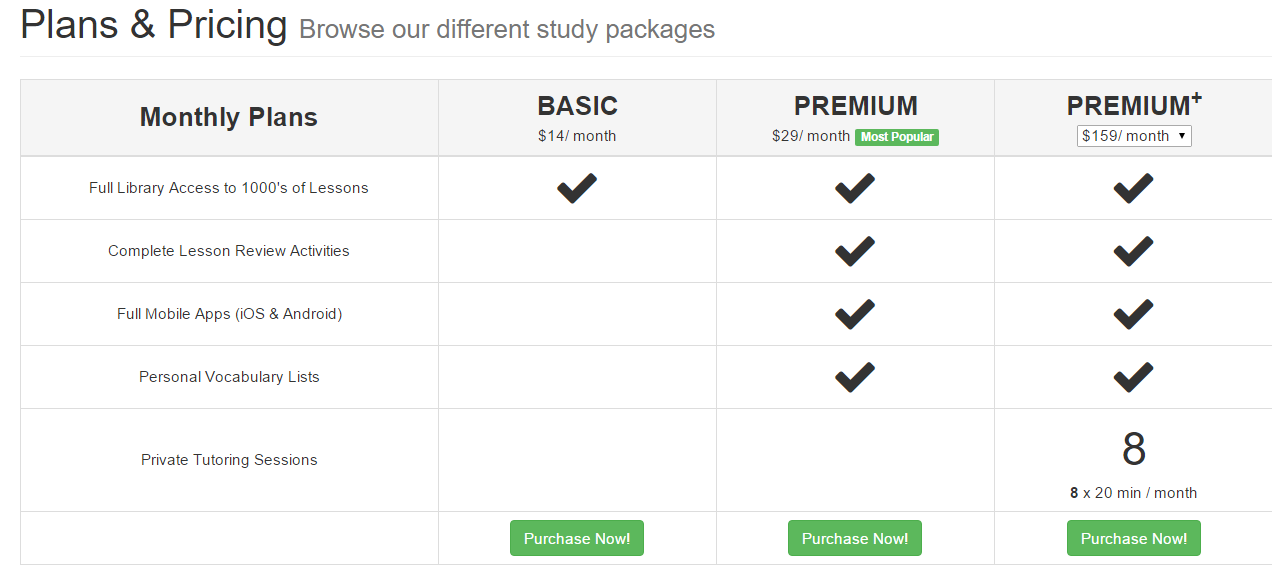
Hi @thatsnice, if you look at the pricing on the ChinesePod website it clearly mentions that access to the iOS and Android app are for the premium subscription.

https://chinesepod.com/pricing/monthly/

I used to be a subscriber to the basic plan as well and never had access to the CPod mobile app(new or old) until I became a premium subscriber. Perhaps you were lucky and there was a bug with your account that allowed you to use the app while on a basic subscription?

I do agree that having the mobile app just for listening and downloading and listening to the lessons should be available to all levels, perhaps this is something that they are looking to change for the new app? I can’t really say, we would have to get a more definite answer from the CPod team. I guess the convenience of using the app, along with the other features is what justify that extra fee over the basic subscription. If you want to listen to the lessons on your device while still keeping the basic subscription then perhaps download the audio files manually and load them on to your phone or tablet for future listening, that’s what I did when I had a basic subscription.

Perhaps @GwilymJames can provide some clarification on what access to the app you should be getting for your basic subscription.

3

@Matt_T Yeah, I’m aware it’s listed like that. I didn’t say they were cheating me, just that it’s different from how it used to be (though now that you bring it up, I’d say they should change “Full Mobile Apps” to just “Mobile Apps” since otherwise it implies some limited access). I have been a subscriber since about 2009 and used several different versions of the app, including both iOS and Android, so I really doubt it was a lucky bug. Anyway, obviously ChinesePod is free to price as they please - it’s a bit expensive for me now but it may still be worth it if I can find another convenient way to listen on my phone. Loading in files is a bit inconvenient but the mobile site might work.

3

[quote=“thatsnice, post:27, topic:140”]
I didn’t say they were cheating me
[/quote] I didn’t think that I mentioned or implied that you were being cheated, that wasn’t my intention. I was just trying to illustrate that the basic plan didn’t include access to the app. Like I said, I was never able to access the app when I was on a basic subscription but was able to when I moved to the premium but if you were there either there was a bug my account or yours. Perhaps some other CPod basic subscribers can comment on their experience with the app.

I agree that this change should be made if app access is limited to those on premium subscription, otherwise it is not very clear.

3

Hi there @thatsnice, the current iOS app (v1.16) only allows you to listen to the full show with a basic subscription. You can’t review the dialogue or vocabulary review mp3, or any of the lesson notes.

A basic subscription on the website lets you stream/download the full lesson, as well as download the PDF notes (dialogue and vocabulary). You also get access to a RSS feed so that you can get all the latest podcasts and PDF notes directly on your favourite podcast app or computer.

The new apps are fully restricted to premium users, to keep in line with our pricing page, and a simpler pricing structure going forward. If you want the convenience of the official app on the move without upgrading, try subscribing using your RSS feed. If you would like to try premium, I can upgrade you for a trial month to see if it fits in with your study schedule. Just let me know your email linked to your account.

Links of interest:

https://support.chinesepod.com/hc/en-us/articles/204475524-What-Does-each-Subscription-Plan-Include-

3

Hi @GwilymJames thanks for confirming that the current apps do allow Basic subscriptions to listen to the audio podcasts, and the new apps do not. Also thanks for offering a trial Premium subscription but I had a 1 yr Premium subscription in the recent past; it’s not for me.

I did laugh at the proposed rationale that this is for a “simpler pricing structure”, as if it’s a consumer benefit :smile: You can just say it’s to increase fees – you are a business striving to earn money, and nothing is wrong with that.

I will point out, though, this isn’t simpler at all, and in fact it seems very odd / out of touch to show a different set of content depending on what device you use to access the site. I use a lot of different paid content/productivity apps – Netflix, New York Times, Slack, Basecamp, etc – and not one of them differentiates between whether you’re viewing their content via an app or the website. You have a pretty good mobile site, too, so I really don’t think many people will be convinced to pay an extra $100/yr just for the convenience of the app over the mobile site. Maybe I’m wrong, though – I trust you will find the pricing strategy that works best (and I sincerely hope you do. I’ve been using CP forever and want to see it last).

3

I fully agree. CPod should either have a separate app that efficiently curates the content to which a Basic subscriber is entitled (I personally dislike iTunes) or find a way to make the existing app differentiate between basic and premium subscribers and serve them content accordingly.

3

Hi, I’m a new Premium user who downloaded the Android app, had trouble initially and then solved it. Thought I’d share my experience here briefly:

Problem: unless I’m missing something, there doesn’t seem to be any ability to build a playlist in the app. This seems like a miss because the shortish duration of the lessons lends itself to playlisting while exercising, commuting, travelling, etc.

Short-term solution: I added the personalized RSS feed to my trusty podcast player. (Note for BeyondPod users: I could only get it to work by setting the ChinesePod feeds up first in Feedly and then using the “Import from Feedly” function in BeyondPod.) So now I can queue up a mix of dialogues and lesson vocab files. Can even see the PDF files in-app. All good.

Long-term solution: Hope you guys can add “add to playlist” function inside the app.

3

Four feature suggestions to enhance UX:

  1. Ability to set download preferences. Right now it asks me every time which of the four components I want to download.
  2. Dark theme
  3. Compact view – right now there’s an awful lot of white space and it takes a lot of scrolling to navigate your impressive collection of lessons
  4. Speed adjustment in the player, just as some podcasts have. As a new users but HSK 4 student, I’d like to be able to tear through the elementary languages quickly just to make sure I didn’t miss anything. But listening to them on normal speed is a waste of time.

Thanks for listening!

3

Thanks for the feedback. We’re currently developing the android app even further, so I have passed these suggestions on to our developer.

3

H Gwilym and fellow CPodders,
Previously I have been able to listen to the sound files for individual words and sentences on the new Android app on my Samsung phone. When I try this now, the app crashes. Everything else works as before.

3

Hi @dorothycowling has there been any recent software update on your phone? Its possible that this could cause the recent bug. There are still some glitches with the android app that the CPod team is looking to resolve so the more information you can share about your the issue the better.

I know I sometimes have to close the app completely or power off my phone and turn it back on before I can get the app to work after it crashes on me. I would suggest you give this a try if you haven’t already.

3

Hi, how do we get the old app. I really liked the translation and glossary features, and offline capabilities seemed better.

Thanks,
Ba

3

Log in to reply to this topic.