Main Site Blog Help

ChinesePod - Podcast (New Beta App Now Available to download on App Store)

Today we are pleased to announce the release of our new iOS app, ChinesePod - Podcast

:fireworks: :fireworks:

This is an early-release version that we will update again in the coming weeks, and continue to actively develop and improve, based on your feedback.

Features of the new app

  • Watch video lessons in the app.
  • word-by-word translations
  • look up sentences and vocabulary in Pleco Dictionary for further study.
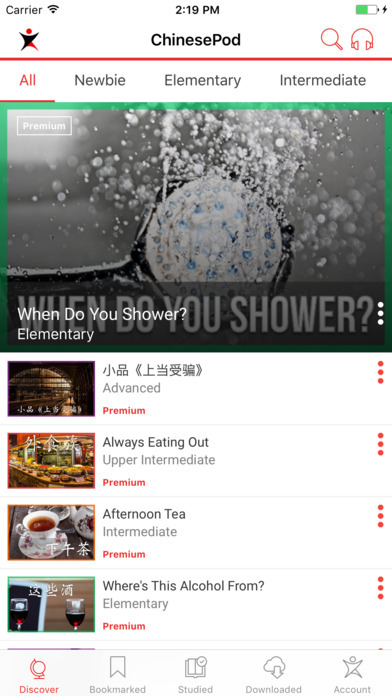
  • Improved UI across the app, with improved dialogue screen
  • Improvements to our API so that lesson data loads faster

Known Bugs/Missing Features

  • Can’t delete offline content (Coming next week)
  • Offline content only includes audio (no lesson data)
  • No progress when downloading content
  • word-by-word translation box only displays simplified Chinese, even if you have traditional on.
  • No native iPad app
  • highlighted text in word-by-word box included an underline. (We will remove this in the next version).

Fixes expected in next version (Expected next week depending on Apple review process)

  • delete downloaded files
  • download multiple files at the same time
  • view lesson data for offline content (vocabulary/ dialogue etc)
  • download in background mode
  • show progress bar on download page when downloading

Coming Soon…

  • Native iPad app
  • Other features based on your feedback.

We hope you enjoy this new version of the app. We have re-written it from the ground up, and our developers will be looking out for your feedback so that they can continually improve it.

Please leave your feedback below

Enjoy

-The ChinesePod Team :slight_smile:

Screenshots

13
created: C Jan '17 last reply: G Feb '17 56 replies 10.1k views 25 users 0 likes 0 links

Frequent Posters

19
9
2
2
2
2
2
2
2
1
1
1
1
1
1
There are 56 replies with an estimated read time of 1 minutes.

Just downloaded and it looks / feels great! Good job. Something to add to the backlog, I would love to see the vocabulary section added to the app where I can then study/review them in a flashcard-like format.

3

Nice piece. Workflow seems to be seamless.
Just run into one issue:
After I have downloaded a lesson and selected the lesson for learning, I got stuck.
How can I go back from lesson learning?

Another issue, the downloaded elementary lessons are shown one time in the All tab, but two times in the Elementary tab.

3

Found resolution for the first issue.
On iPhone messages like “You have bookmarked a lesson successfully” are rolled in from top, but they are not automatically rolled back after some seconds. Pushing the message to the top to the outside of the mobile, unveils the hidden tabs.

3

Third issue:
The bookmarked lessons from the Chinese pod website are not reflected in the app. Seems there are two separate “bookmarks”, one for website, one in the app. Can they be aligned?

3

Fourth issue:
Intro, Vocabulary, Dialogue, Expansion are only shown in the Bookmarked tab. The same lesson in the Downloaded section only gives Intro. Neither Vocabulary, nor Dialogue or Expansion are shown.

3

Please do not misunderstand the issues I have highlighted. Simply take them as my contribution to improve the app. Already in this alpha state the app is way better than the old one.
Btw, might be helpful if you setup a small bug tracking software, like GitHub or similar.

3

Ouch, maybe I’m wrong, but if I download an episode and then disable the internet connection, the episode is not presented. This was one of the major flaws of the old app. I hope this is only due to beta state. If the internet connection is mandatory, it would be really weird.

3

Thanks for your detailed feedback @GeorgL . Regarding your above remark on downloaded lessons not having data, this should be fixed in the next update (see above: view lesson data for offline content (vocabulary/ dialogue etc).

We already have a bug tracking platform, but since our most active users are already using the forum, we thought we would take requests and feedback from you guys here, and feed it into our bug tracker.

3

Thanks. So the notification should auto hide after a second or two.


@JohnnySung @ThanhCao

3

This should work fine. I have just tested by repeatedly downloading a lesson, then turning on airport mode, and the lesson appears in downloads and plays the 3 audio lessons (without lesson data like vocab etc). Could you try again to confirm?

3

Do you have a screenshot of this? The app should sync bookmarks and studied lessons between website and app.

3

I’ve given it another try, bookmarking an new episode on the website. After updating in the app (sliding down on the “Bookmarked” tab to trigger the update) it finally showed the freshly bookmarked episode. So, no issue there.

3

I’m sorry, but this does definitely not work on my side. I’ve bookmarked a new episode on the website, updated in the app, the lesson is shown in the bookmarked-tab, then selected the context-menu, pressed “Download” and the lesson was downloaded. At least it lasted 5-6 seconds, then the message “You have downloaded a lesson successfully” appeared. Then I enabled flight-mode on my iPhone. Selected the just downloaded episode in the bookmarked tab. The intro-page is shown without problem. But if I slide to the right, to see the “Vocabulary”-tab, the animation of the ChinesePod-logo is shown continuously. But not the vocabulary. However the app is still fully reactive. I can slide to the next tab “Dialogue” without problem, however the content - the dialogue - is not shown. Sliding back to “Intro” is possible.
If I disable flight-mode and again go to the “Bookmarked”-tab, selecting the previously downloaded lesson, I get the “Intro” without problem. If I slide to “Vocabulary” the vocabulary is shown instantenously. I suspect that the downloaded data is effectively used, however there is something else attempted to be taken from online-connection (ID, session-id, cache-sync, whatsoever). And that’s prevented in offline-mode.

3

Offline downloaded lesson data should be fixed in the next version. At the moment you can only listen to audio in the downloaded section (with or without internet)

3

Hi Chinesepod Team, I just downloaded the new app and trying it out.

Here are my specs:
IOS Version: 10.2
Location: China
Logged into my Premium Account

Remark: Overall good feel, but some functionality is still lacking - could be because this is the beta-version.

I’ve run into a few issues, here’s my feedback:

  1. No Audio: Big Issue. I have tried multiple ways to play lessons.

Discover -> lessons, dialogue, and vocabulary review. Often will not play. If it does, there is no audio.
Discover -> Vocabulary -> Will play, but no audio.
Bookmarked -> lessons, dialogue, and vocabulary review. Often will not play. If it does, there is no audio.
Downloaded -> lessons, dialogue, and vocabulary review. Will play, but no audio.

Just in case you are wondering… I did check my volume. :slight_smile:

  1. Search. When I search words like “rent” or “math”, the All tab shows the lessons but repeats them over and over. This only happens on some words, for instance, it didn’t work with “monopoly”. Also, if I try to search from the “Search Results” page, the keyboard does not disappear, which is a little irritating.

  2. Download Speed. Very Slow. I like to think my internet speed is not too poor for China, but I had to wait upwards a few minutes for the download to complete. At least it downloaded… Could be China internet speed… The progress bar and background downloading might help with this.

  3. Download Content on Airplane Mode. The good news is that I could play the downloaded content with Airplane mode, or at least see that it was playing since I still didn’t have any audio.

I’ll keep using it and keep you posted on further suggestions for improvement.

3

Hello, thank you for the new app! I just started exploring and I have a few initial comments:

  1. I don’t think it’s necessary to have the word “premium” in red under every single lesson. (I am logged into my premium account.) Pretty much everything is “premium” these days except for a handful of Newbie lessons, I think. I do like the “video” label.
  2. “Bookmarked” doesn’t seem to work right. When I tapped it, the list just went on and on, and I don’t think I ever bookmarked that many lessons. (I was looking forward to this feature because I can’t figure out how to view my bookmarked lessons on the regular site.)
  3. Please expand the search function to include partial words. For example, the word “neighbor” should trigger the lessons with the word “neighbors” in them. Also pinyin.
  4. I would love the search function to include the vocab lists also. This would be useful if I want to explore all the ways a certain word has been used in various lessons (especially useful for words with a lot of uses).

I’ll keep testing. Thank you!

3

Hi, Thanks for the new release, just downloaded today and seems to be really better than before.

Few remarks:

  • Is it possible to have a setting for the size of the text in Dialogue tab? I have the feeling the Chinese characters are a bit too small and require effort for me to keep focus and follow. Maybe also increase a bit the space between lines and characters can help.

-The audio stops as soon as the phone auto-lock. Would that be possible to continue to play the audio while the phone is locked manually or automatically?

Thanks

3

I’m sorry to hear this. It sounds like our Amazon servers are being blocked in China. Where about’s are you located?

Could you try using a VPN and see if that works?


@John

3

We hope to have adjustable font size for Chinese in the up-coming versions.


@JohnnySung

3

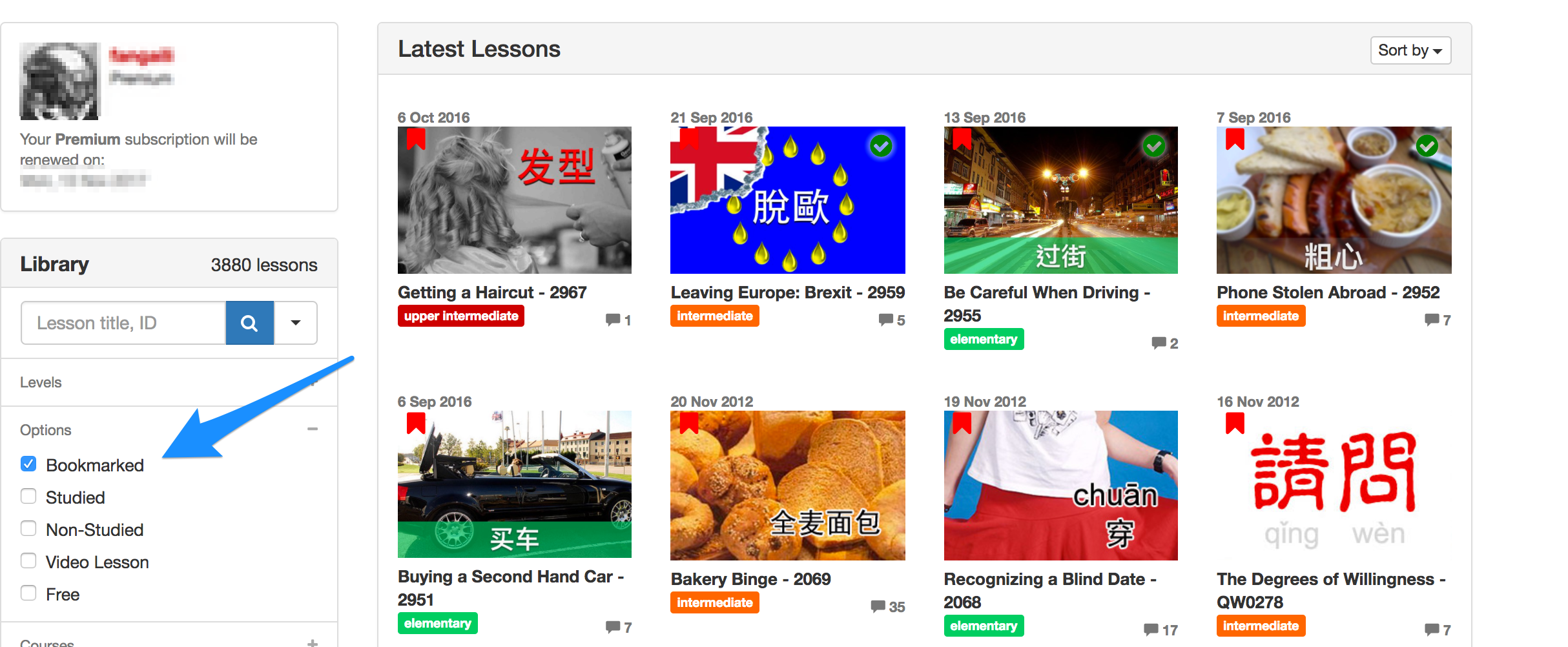
You seem to already have quite a lot of bookmarks. You can do it here. And here is a support article

This will be removed in the next version.

3

太好了!

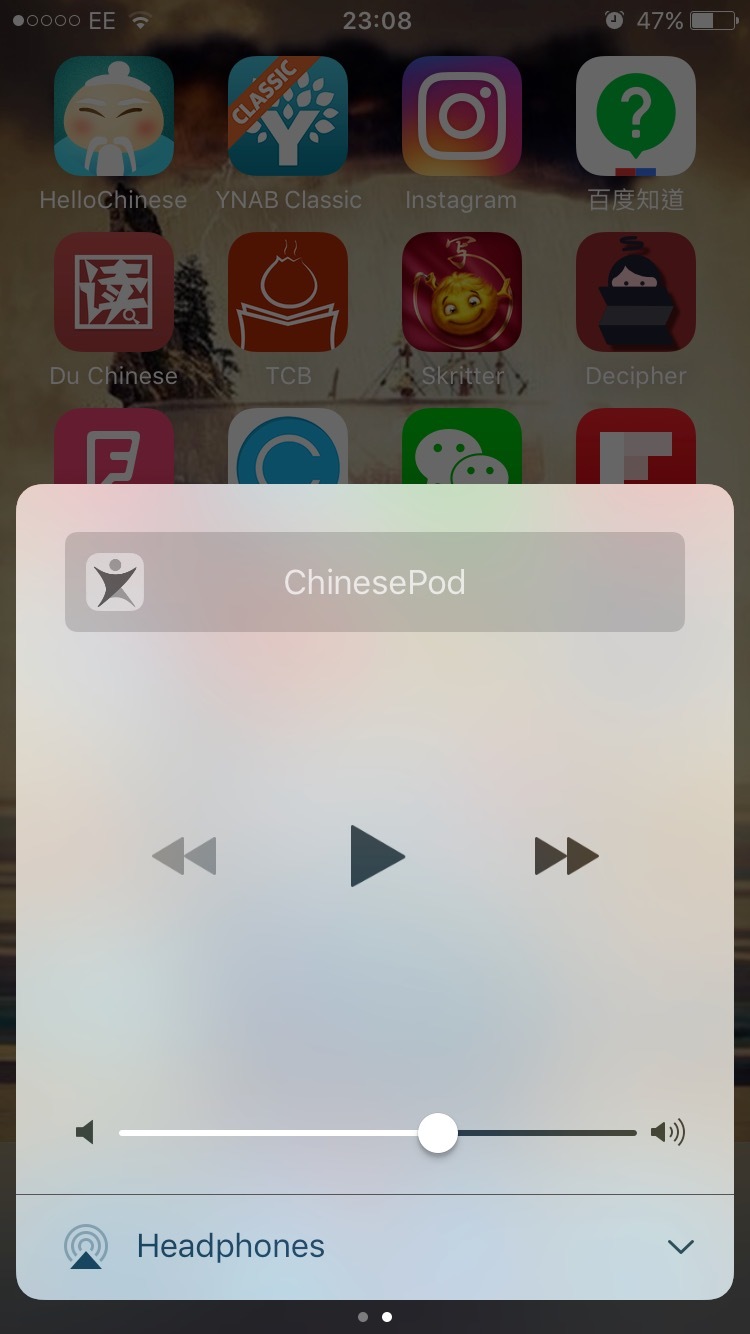
It would be really great to listen to the video outside of the app. When this works you can lock the phone and the audio keeps playing as well. This is great for being on the go and exercising whilst listening to the lessons. I think the old app does this as an example.

Also when you play videos from safari you can stop and resume the audio from outside the app so it should be possible for videos too hopefully.

Current situation is that nothing really happens with any of the controls outside the app.

Great to see some progress!

Update: looks like it works for audio lessons but not video lessons.

3

It would be great if the roller drop down with the playback controls would “push down” the rest of the interface instead of covering it and making everything else unclickable. I noticed you can toggle it on and of in the top right but it feels a little awkward if you, like I do on some lessons, try to listen to the dialogue while following along in the transcript and pausing to look up unknown words by changing to the vocabulary view. As of now i have to pause, disable playback bar, look up word, enable playback bar, start playback. It also feels unintuitive that the rest of the UI is “un-scrollable” while the playback bar is active.

Otherwise my first impressions of the app is really good, I agree that the app already feels better than the last one!

3

Hey, looks good so far, but is it possible to put in a “non-studied” tab or something similar like on the website? It becomes a real pain to scroll down forever to find new episodes once I’ve studied all the recent ones.

Thanks for your consideration!
Colin

3

I’m using it since weeks… :smiley: Because I’m a VIP member right?

3

Cannot listen to audio on locked screen-- major bummer. Please inform of a fix of this issue.

Cannot listen to audio when app minimizes-- second major bummer.

When “play” is press from the bottom task bar outside the app, no audio is played. Is it downloading the whole file? Or can the file begin immediately streaming audio while the remaining parts download?

The lag between pressing “play” and audio playing is very long.

Headphones are a confusing icon for audio because on a phone a headphones icon more accurately represents headphones. A speaker icon might be better, or a visually enhanced play button.

There also needs to be button “|<” to rewind to beginning of track. A 15 second rewind might be helpful too.

Finally, the indication on whether the episode has been studied or not does not work when marked from the parent menu. The “mark as studied” only works within the given lesson window.

Bonus if the “studied” could sync with the website and also if the studied lessons could be tabbed elsewhere or shuffled to the bottom.

3

Dear Developers,

I can see you guys try best on the new programs.

But I can not see any Playlist in this. It seems very important because many people wants to focus on a series of lessons that helps learners a lot.

Thanks

3

Thanks for your feedback, and kudos for the amount of Chinese learning apps on your home screen!

Regarding background audio for video lessons, we’ll look into the API docs for Wistia and see if this is possible.

Background for audio lessons should work fine in the meantime, so perhaps just click the audio lesson rather than the video play-button if you want to lock the screen until we have a fix.

3

We’re looking to add playlists in the coming versions and this is high on our list. Thanks

3

This sounds like a bug. Can you try closing the app completely (remove from app drawer) and trying again. I’m trying to re-create this issue on my device. [quote=“321085710, post:28, topic:1939”]

The lag between pressing “play” and audio playing is very long.
[/quote]

What’s your internet speed. I’m checking with the developers to make sure the audio streams rather than downloads then plays.

Good idea. We will look at updating it. [quote=“321085710, post:28, topic:1939”]
There also needs to be button “|<” to rewind to beginning of track
[/quote]

Hope to add this on a version soon.

What you mean is that you would appreciate a bookmark/and tick icon on those lessons on the main page correct?

If you bookmark a lesson or click studied, it should show on the website instantly on the dashboard. Click here to find out where.

I’ve noted down your feedback and alerted our developers.

3

This sounds like a bug. Can you try closing the app completely by double clicking the home button and swiping up. We’re trying to re-create this bug.

3

Thank you.

When the display dims and eventually auto-locks, the audio stops. Also, if I hit the power to lock the screen/turn off the display, the audio stops. It makes listening while driving a task! I’ve restarted the phone and terminated the app without resolve. I have other streaming apps: some are programmed to remedy this issue, others are not. This is feedback I’ve sent to developers of other streaming apps.

Speed is LTE. I’ve noticed that some lessons won’t play at all. I have to choose another lesson.

As for the “Marked as Studied”-- it is a minor. Sorry for my poor description! If I click on the right three dots on a lesson from the “All” menu and mark is as “Mark as Studied”. Then, I enter into the lesson. The icon that says “mark studied” does not change to “studied”. It is only within the lesson that I “mark as studied” that this icon changes.

Thanks for your personal response. I enjoy being able to give feedback, some of which I hope is beneficial. I’m enjoying your podcast immensely, everyday.

3

I see what you mean. I have the same problem. The icon is only marked red if you enter it via Studied tab. We also need to add a “pull to refresh” option for these pages.

3

@321085710 I’ve found you need to refresh the lesson list by pulling to refresh on the All tab for the icons to update. I’ll see if our developers can improve this.

3

Feedback: the login screen says invalid password if the email is not correct

3

Hi Gwliym,

Thank you for your feedback. I tried the VPN. No luck.

Also, I just downloaded the new Chinesepod App on my Ipad Air 2 (IOS 10.1.1) and the audio works fine… It leads me to believe that it is not an issue with the Amazon servers. Is it possible that it could not be supporting my Iphone 5 or the IOS 10.2?

My phone doesn’t seem to have any other audio issues… I can listen to audio through all my other apps (music, audible, etc.)

Hope you can look more into this issue…

3

Viewed this today. Thanks a lot, it’s certainly a lot more comfortable using than before! :slight_smile:

3

@ThanhCao @JohnnySung Please test compatibility with iPhone 5 to double check. Perhaps the next update will fix it.

3

App immediately crashes when starting. What’s going on?

3

Please remove your current chinesepod application and download it again from app store.

3

@GwilymJames I think maybe a note should be put in the app store description. If I didn’t know about the forum, I’d have no idea to just delete and reinstall. Great job updating so regularly!

3

(1) Weird minor potential bug - when I downloaded a mix of 30 intermediate & upper intermediate lessons, only 20 (I believe the first 20 downloaded) show up in the “All” section of the “Downloaded” tab. However when I go to each section “Intermediate” & “Upper Intermediate”, they are all there.

(2) There is choppiness when switching between the separate sections of the “Downloaded” podcasts (Into --> Vocabulary --> Dialogue --> Expansion, etc). Running iOS 10.2.1 on iPhone 6 Plus.

Apologies if these were reported already above - the thread is getting long!

Thanks for the all the updates!

3

App still not working, can’t play audio of downloaded lessons without internet connection. App is in no state to be released. Very frustrating. However you are still happy to charge users for the subscription, not good enough.

3

Setting my mobile into flight-mode the download does have the complete audio available. However the single pieces in dialogue are missing.

3

I’d love to try the beta app. I’ve downloaded it on my Android phone and I’m assuming I need to log in using my existing Chinesepod log in details - but it won’t let me! It keeps telling me the password or email is in error. Can you please advise? Or do I have to sign up separately on the new app? Tried this already and it told me that my email (the one I’ve registered with on the original Chinesepod website and app) was already in use.

3

I still cannot listen to the audio ouside the app or when locking the phone. It worked once but now the audio just stops when i lock the phone. It looks like the AudioSession is not correctly configured. This is on iOS 10.2

3

When you download a lesson and go offline, you should have access to all the lesson MP3s (lesson/dialogue/vocabulary review). However, it doesn’t download individual mp3’s for the vocabulary and sentences. We did this to save space and time, but if you feel this is a feature you would like, we could look into adding it.

3

This sounds like a bug. Could you try the following workaround:

  • Delete and re-install the app.

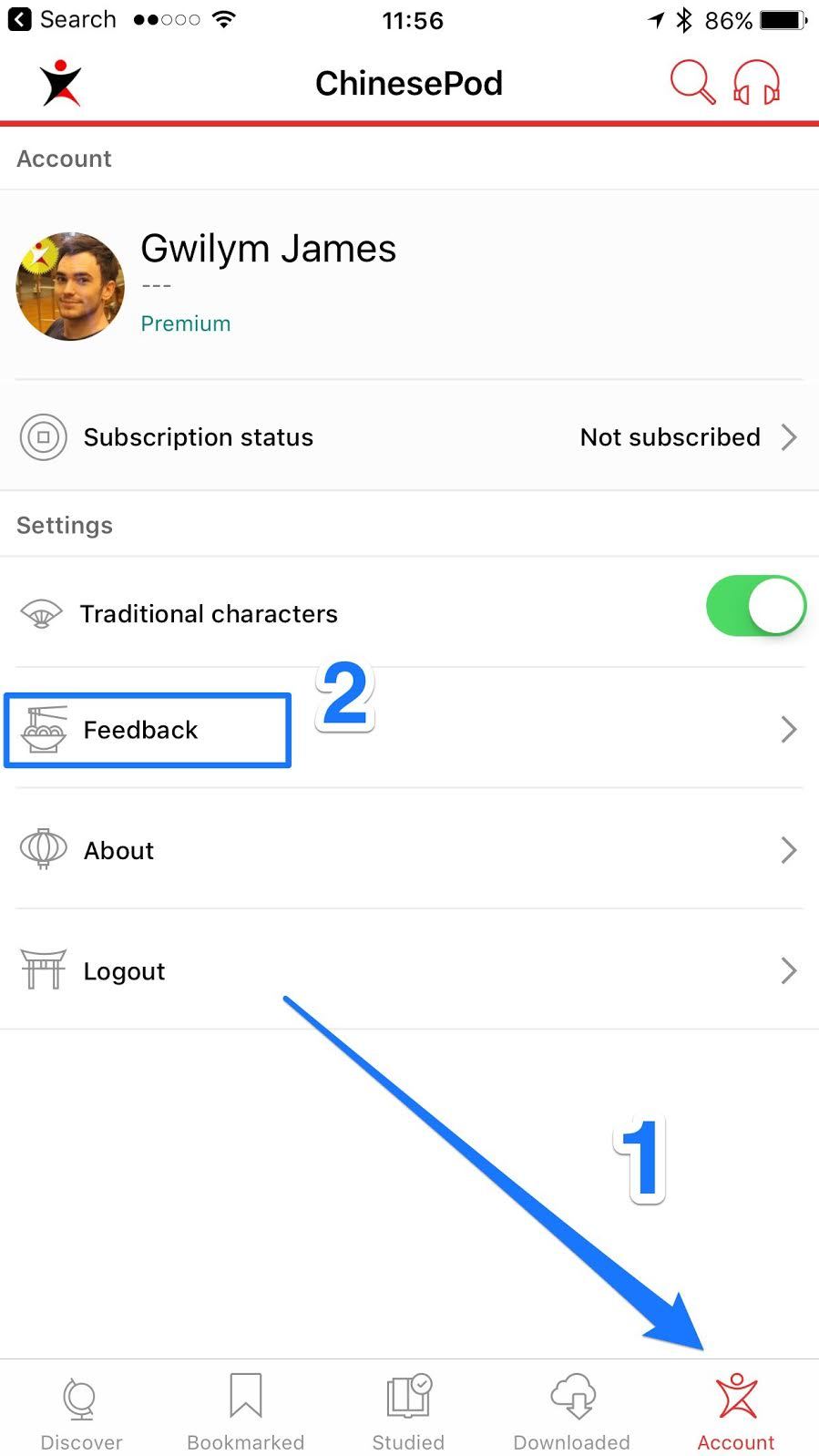
  • If the bug still happens, use the in-app feedback found in the settings tab so that we can see your device information to help us resolve this bug.

3

Thanks, i’ve done that but it did not resolve the issue. Will report via the app.

3

I there. We are working on fixing this bug. Can you delete the app and download the latest version, and if it still happens, use the in-app feedback button located in settings, so that we can get all your device details to help the developers.

3
  1. Is there no way to save vocabulary? This seems like a crucial feature so maybe I’m just missing it.

  2. Agree with the earlier user who said that it would be useful to have buttons on the audio files that allow you to rewind and fast-forward by 5 seconds at a time. Scanning the playback dot with your finger is really imprecise if you just want to jump back or forward a few seconds.

3

Besides being unable to save vocab, a couple more kinks in the word-by-word display:

  1. If the line of dialogue is too long (e.g., most lines in most Advanced lessons), you can’t see the English translation of a word, and as far as I can tell there’s no work-around (i.e., it gets cut off below the pinyin).

  2. The ability to select words in the word-by-word by touching them seems very buggy. I’ll try to touch a character and the red highlight will jump to some other far-away random one instead of the one I tried to highlight.

3

Hi ChinesePod,

I was able to use the app, it after a while the app crashed and I’m not able to use it anymore. I use an iPhone 7 plus with iOS 10.2.1, although it crashed in an earlier version. I hope you can help me fix this problem because I enjoyed the new app! If the developers need more info about my device please ask me!

Thank you for the awesome content you guys are making!

Sander

3

Hi ChinesePod,

I was able to use the app, it after a while the app crashed and I’m not able to use it anymore. I use an iPhone 7 plus with iOS 10.2.1, although it crashed in an earlier version. I hope you can help me fix this problem because I enjoyed the new app! If the developers need more info about my device please ask me!

Thank you for the awesome content you guys are making!

Sander

Please upgrade your app to the latest version (0.8.3, published on 5 Feb, 2017)

3

厉害! Thanks a lot! It’s working again! 谢谢你们帮忙我 :grinning:

3

Could this be fixed soon? It is really a problem for me that the audio stops as soon as the phone is locked.
Sometimes I still can listen to the audios, but sometimes I can’t.

3

For all bugs related to the current version of the app, we’d like to ask users to use the In-App feedback option. This will help the developers see what device and version you are using.

This current topic is now closed, but we’ll open another one for the next big update.

3

Log in to reply to this topic.